
邮件发送
pom.xml
xml
        <!-- Mail邮件服务启动器 -->
        <dependency>
            <groupId>org.springframework.boot</groupId>
            <artifactId>spring-boot-starter-mail</artifactId>
            <version>${spring-boot.version}</version>
        </dependency>
申请授权码
授权码是QQ邮箱用于登录第三方客户端的专用密码,适用于登录以下服务:
POP3/IMAP/SMTP/Exchange/CardDAV/CalDAV服务- 授权码仅用于邮件客户端登录,而不能登录邮箱网页后台管理端
- 即使泄露授权码,对方也无法登录网易或腾讯系统账号后台,这样影响也相对较小,从而保证邮箱的安全
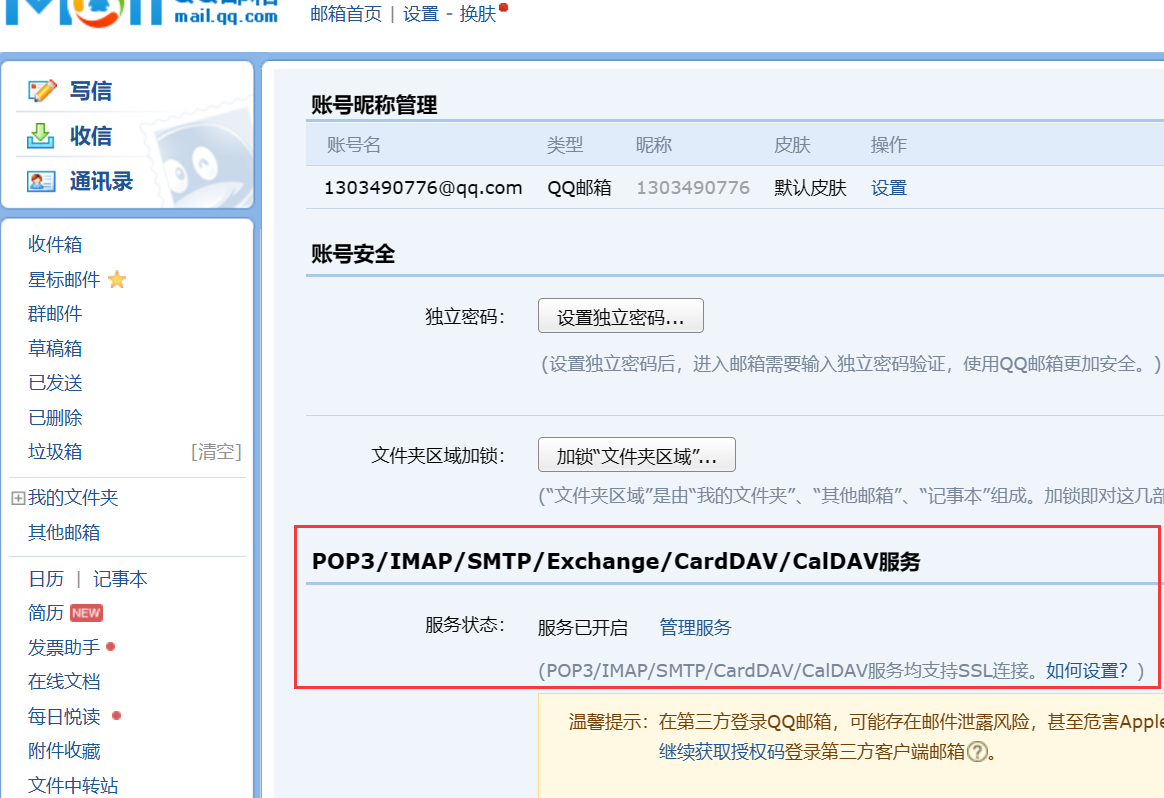
在QQ邮箱的设置->账户中申请授权码:
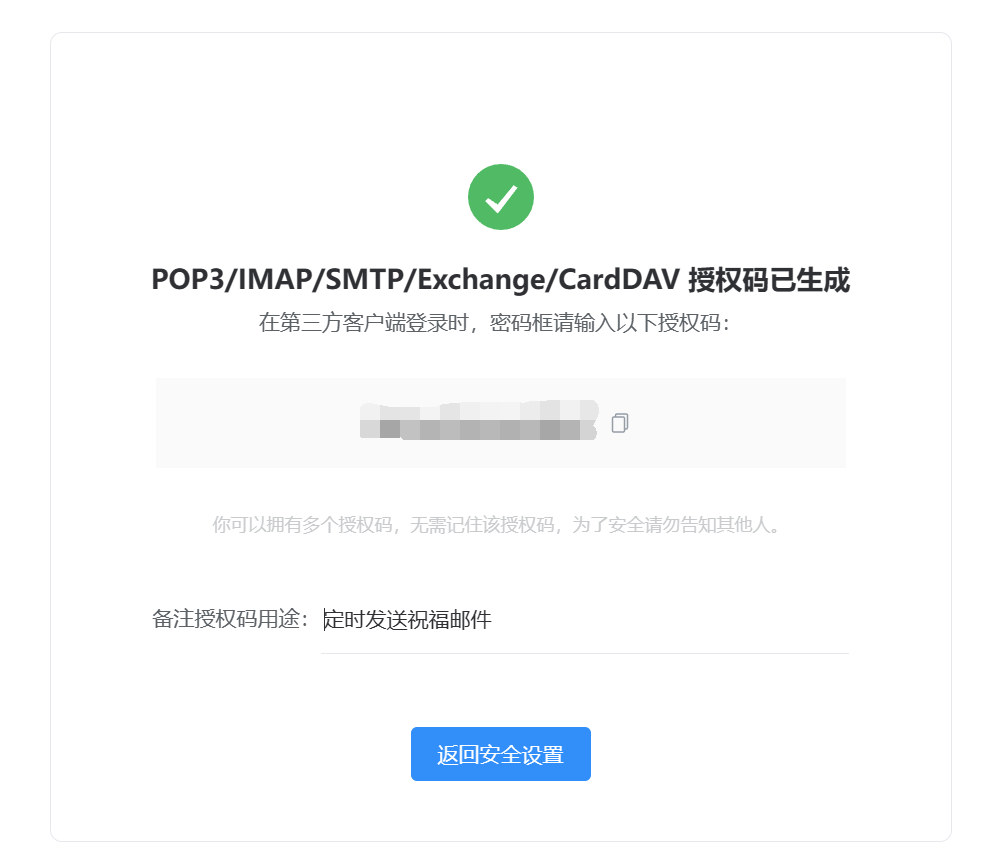
获取授权码:
示例代码
SimpleMailMessage是Spring Framework中用于简单邮件发送的类,它提供了一种简单的方式来创建和发送邮件,适用于发送纯文本的简单邮件。通常情况下,SimpleMailMessage适用于简单的文本邮件发送,但对于复杂的邮件格式或包含附件的邮件,则需要使用MimeMessage
MimeMessage是JavaMail API中表示MIME(Multipurpose Internet Mail Extensions)格式的邮件消息的类。MIME是一种标准的邮件格式,支持发送HTML内容、附件、内嵌图片等复杂的邮件格式。通过MimeMessage类,您可以更灵活地控制邮件的格式和内容,包括设置邮件的头部信息、多种类型的内容和附件等password为授权码
直接发送
java
    @Test
    public void testEmail() throws MessagingException {
        JavaMailSenderImpl mailSender = new JavaMailSenderImpl();
        mailSender.setHost("smtp.qq.com");
        mailSender.setPort(587);
        mailSender.setUsername("xxx@qq.com");
        mailSender.setPassword("password");

        Properties properties = mailSender.getJavaMailProperties();
        properties.put("mail.smtp.auth", "true");
        properties.put("mail.smtp.starttls.enable", "true");

//        // 简单发送
//        SimpleMailMessage simpleMailMessage = new SimpleMailMessage();
//        simpleMailMessage.setTo("xxx@qq.com");
//        simpleMailMessage.setSubject("你好,世界");
//        simpleMailMessage.setText("世界你好");
//        mailSender.send(simpleMailMessage);

		// 完整发送
        MimeMessage message = mailSender.createMimeMessage();
        MimeMessageHelper helper;
        helper = new MimeMessageHelper(message, true);
        helper.setTo("xxx@qq.com");
        helper.setSubject("我的小号");
        // 参数为true代表为html
//        helper.setText("你好世界", true);
        helper.setText("你好");
        helper.setFrom("xxx@qq.com");  // 设置有效的发件人地址
        mailSender.send(message);

        System.out.println("发送成功");
    }
Spring环境发送
application.yaml
yaml
spring:
  mail:
    host: smtp.qq.com
    port: 465
    username: xxx@qq.com
    password: xxxxxx
    properties:
      mail:
        smtp:
          ssl:
            enable: true
          auth: true
          connectiontimeout: 30000
          timeout: 30000
          writetimeout: 30000
          from: xxx@qq.com
        transport:
          protocol: smtps
MainApplication.java
java
    //程序运行入口
    public static void main(String[] args) throws MessagingException {
        //主方法返回IOC容器
        ConfigurableApplicationContext ioc = SpringApplication.run(MainApplication.class, args);

        JavaMailSenderImpl mailSender = ioc.getBean(JavaMailSenderImpl.class);

        MimeMessage message = mailSender.createMimeMessage();
        MimeMessageHelper helper;
        helper = new MimeMessageHelper(message, true);
        helper.setTo("xxx@qq.com");
        helper.setSubject("我的小号");
        // 参数为true代表为html
//        helper.setText("你好世界", true);
        helper.setText("你好");
        helper.setFrom("xxx@qq.com");  // 设置有效的发件人地址
        mailSender.send(message);

        System.out.println("发送成功");
    }
Python代码
使用STARTTLS的SMTP连接 (端口587)
python
import smtplib
from email.mime.text import MIMEText
from email.mime.multipart import MIMEMultipart
import os

# 从环境变量中读取发件人邮箱和密码
from_address = os.getenv('EMAIL_FROM', 'xxx.cn')
password = os.getenv('EMAIL_PASSWORD', 'password')

# SMTP服务器配置
smtp_server_tls = 'smtp.exmail.qq.com'  # QQ企业邮箱的SMTP服务器地址
smtp_port_tls = 587  # 使用STARTTLS的端口号

def send_email_tls(to_address, subject, body):
    # 创建MIME多部分消息
    message = MIMEMultipart()
    message['From'] = from_address
    message['To'] = to_address
    message['Subject'] = subject

    # 添加正文到消息中
    message.attach(MIMEText(body, 'plain'))

    try:
        # 连接到SMTP服务器并登录 (使用STARTTLS)
        with smtplib.SMTP(smtp_server_tls, smtp_port_tls) as server:
            server.starttls()  # 启用TLS加密
            server.login(from_address, password)

            # 发送邮件
            server.sendmail(from_address, to_address, message.as_string())
            print(f"邮件发送成功至 {to_address}")
    except Exception as e:
        print(f"发送邮件时出现错误: {e}")

# 使用示例
if __name__ == '__main__':
    to_addr = 'recipient@example.com'  # 接收者的邮箱地址
    mail_subject = '测试邮件 - STARTTLS'
    mail_body = '这是一封使用STARTTLS加密的测试邮件内容。'

    send_email_tls(to_addr, mail_subject, mail_body)
使用SSL/TLS直接加密的SMTP连接 (端口465)
python
import smtplib
from email.mime.text import MIMEText
from email.mime.multipart import MIMEMultipart
import os

# 从环境变量中读取发件人邮箱和密码
from_address = os.getenv('EMAIL_FROM', 'xxx.cn')
password = os.getenv('EMAIL_PASSWORD', 'password')

# SMTP服务器配置
smtp_server_ssl = 'smtp.exmail.qq.com'  # QQ企业邮箱的SMTP服务器地址
smtp_port_ssl = 465  # 直接使用SSL/TLS加密的端口号

def send_email_ssl(to_address, subject, body):
    # 创建MIME多部分消息
    message = MIMEMultipart()
    message['From'] = from_address
    message['To'] = to_address
    message['Subject'] = subject

    # 添加正文到消息中
    message.attach(MIMEText(body, 'plain'))

    try:
        # 连接到SMTP服务器并登录 (使用SSL)
        with smtplib.SMTP_SSL(smtp_server_ssl, smtp_port_ssl) as server:
            server.login(from_address, password)

            # 发送邮件
            server.sendmail(from_address, to_address, message.as_string())
            print(f"邮件发送成功至 {to_address}")
    except Exception as e:
        print(f"发送邮件时出现错误: {e}")

# 使用示例
if __name__ == '__main__':
    to_addr = 'recipient@example.com'  # 接收者的邮箱地址
    mail_subject = '测试邮件 - SSL'
    mail_body = '这是一封使用SSL/TLS直接加密的测试邮件内容。'

    send_email_ssl(to_addr, mail_subject, mail_body)
企业邮箱
官网:https://www.aurorasendcloud.com/zh-cn/
开发手册:https://www.aurorasendcloud.com/docs/zh/SendCloudSMTP/SMTPAccess/
临时邮件:
发送类型:
| 特性 | TO(主收件人) | CC(抄送) | BCC(密送) |
|---|---|---|---|
| 可见性 | 所有收件人可见 | 所有收件人可见 | 完全不可见 |
| 责任 | 主要负责处理 | 仅需知晓 | 仅需知晓 |
| 回复行为 | 需要回复 | 一般无需回复 | 一般无需回复 |
| 隐私保护 | 无 | 无 | 完全隐私保护 |
| 群发显示 | 显示所有地址 | 显示所有地址 | 只显示虚拟/单一地址 |
| 适用场景 | 主要处理者 | 相关方通知 | 匿名群发、隐私保护 |
发件人地址的双重身份
在邮件协议中存在两种发件人地址:
java
InternetAddress("from@sendcloud.org", "发件人显示名称", "UTF-8")- 信封发件人 (MAIL FROM):
- 代码中的
"from@sendcloud.org" - 用于SMTP通信协议层(邮件传输路径)
- 负责接收退信通知(NDR)
- 用户不可见
- 代码中的
- 信头发件人 (Header FROM):
- 真正的显示发件地址
- 决定用户在收件箱看到的地址
- 必须通过SendCloud的SPF/DKIM验证
- 账户注册时设置的
...@notifications.xxx.com
SendCloudSmtp.java
java
import java.io.File;
import java.io.UnsupportedEncodingException;
import java.util.Properties;

import javax.activation.DataHandler;
import javax.activation.DataSource;
import javax.activation.FileDataSource;
import javax.mail.Authenticator;
import javax.mail.BodyPart;
import javax.mail.Message.RecipientType;
import javax.mail.MessagingException;
import javax.mail.Multipart;
import javax.mail.PasswordAuthentication;
import javax.mail.Session;
import javax.mail.internet.*;

import com.sun.mail.smtp.SMTPTransport;

public class SendCloudSmtp {

    private static final String SENDCLOUD_SMTP_HOST = "smtp2.sendcloud.net";

    private static final int SENDCLOUD_SMTP_PORT = 2525;

    private static Properties getProps() {
        // configure javamail
        Properties props = new Properties();
        props.setProperty("mail.transport.protocol", "smtp");
        props.put("mail.smtp.host", SENDCLOUD_SMTP_HOST);
        props.put("mail.smtp.port", SENDCLOUD_SMTP_PORT);
        props.setProperty("mail.smtp.auth", "true");
        props.put("mail.smtp.connectiontimeout", 18000);
        props.put("mail.smtp.timeout", 60000);
        props.setProperty("mail.mime.encodefilename", "true");
        return props;
    }

    private static Session getSession(String apiUser, String apiKey) {
        return Session.getInstance(getProps(), new Authenticator() {
            @Override
            protected PasswordAuthentication getPasswordAuthentication() {
                return new PasswordAuthentication(apiUser, apiKey);
            }
        });
    }

    private static MimeMessage getMessage(Session mailSession, String address, String from, String to, String subject,
                                          String messageBody, RecipientType type, String... filePaths)
            throws MessagingException, UnsupportedEncodingException {
        MimeMessage message = new MimeMessage(mailSession);
        // The from, use the correct email address instead
        // Automatically replace the sender's address with the verified address corresponding to the account
        message.setFrom(new InternetAddress(address, from, "UTF-8"));
        // The recipient addresses,use the correct email address instead
        InternetAddress[] addresses = InternetAddress.parse(to);
        message.addRecipients(type, addresses);
        // Mail theme
        message.setSubject(subject, "UTF-8");

        Multipart multipart = new MimeMultipart("alternative");

        // Add HTML message body
        BodyPart contentPart = new MimeBodyPart();
        contentPart.setHeader("Content-Type", "text/html;charset=UTF-8");
        contentPart.setHeader("Content-Transfer-Encoding", "base64");
        contentPart.setContent(messageBody, "text/html;charset=UTF-8");
        multipart.addBodyPart(contentPart);

        // Add attachment ( SMTP cannot use FileStream )
        if (filePaths != null) {
            for (String filePath : filePaths) {
                File file = new File(filePath);
                BodyPart attachmentBodyPart = new MimeBodyPart();
                DataSource source = new FileDataSource(file);
                attachmentBodyPart.setDataHandler(new DataHandler(source));
                attachmentBodyPart.setFileName(MimeUtility.encodeWord(file.getName()));
                multipart.addBodyPart(attachmentBodyPart);
            }
        }

        message.setContent(multipart);
        return message;
    }

    public static void main(String[] args) throws MessagingException, UnsupportedEncodingException {
        // Verification using api_user and api_key
        final String apiUser = "xxx";
        final String apiKey = "xxx";

        String address = "from@sendcloud.org";
        String from = "fromname";
        // Multiple target users separated by ','
        String to = "xxx@qq.com";

        String subject = "SendCloud java smtp example";
        String messageBody = "<html><head></head><body>" + "<p>Welcome to<a href='http://sendcloud.sohu.com'>SendCloud!</a></p>" + "</body></html> ";

        // Send type
        RecipientType type = RecipientType.BCC;

        Session mailSession = getSession(apiUser, apiKey);
        SMTPTransport transport = (SMTPTransport) mailSession.getTransport("smtp");

        MimeMessage message = getMessage(mailSession, address, from, to, subject, messageBody, type);

        // Connect to sendcloud server and send mail
        transport.connect();
        transport.sendMessage(message, message.getRecipients(type));

        // Result
        String messageId = getResponse(transport.getLastServerResponse());
        String emailId = messageId + "0$" + to;
        System.out.println("messageId:" + messageId);
        System.out.println("emailId:" + emailId);
        transport.close();
    }

    private static String getResponse(String reply) {
        String[] arr = reply.split("#");

        String messageId = null;

        if (arr[0].equalsIgnoreCase("250 ")) {
            messageId = arr[1];
        }

        return messageId;
    }
}