
RestTemplate
使用介绍
- 发送GET请求:使用
getForObject或getForEntity方法发送GET请求。这些方法接受URL和响应类型等参数,并返回响应体或包含响应体的ResponseEntity对象- 发送POST请求:使用
postForObject或postForEntity方法发送POST请求。这些方法接受URL、请求体、请求头和响应类型等参数,并返回响应体或包含响应体的ResponseEntity对象- 发送其他类型的请求:RestTemplate还提供了用于发送PUT、DELETE等其他类型HTTP请求的方法,如
put、delete等- 自定义请求头和参数:可以在发送请求时设置自定义的请求头和参数,以满足特定的需求
- 异常处理:RestTemplate在发送请求或处理响应时可能会抛出异常,如
HttpClientErrorException和HttpServerErrorException等。可以根据需要捕获这些异常并进行适当的处理- 异步支持:RestTemplate还提供了异步版本的HTTP请求方法,如
asyncGetForObject和asyncPostForObject等,用于在异步场景下发送HTTP请求- 底层HTTP客户端的配置:RestTemplate允许配置底层的HTTP客户端库,如设置连接超时时间、读取超时时间、最大连接数等
- 泛型支持:RestTemplate的方法支持使用泛型来指定响应体的类型,这样可以方便地处理不同类型的响应数据
- 自定义转换器:RestTemplate允许注册自定义的转换器,用于将HTTP响应体转换为Java对象或将Java对象转换为HTTP请求体
- 与Spring集成:RestTemplate可以与Spring的其他功能集成,如使用Spring的
@Autowired注解注入RestTemplate实例,或使用Spring Boot的自动配置功能简化RestTemplate的配置和使用从Spring 5开始,RestTemplate已被标记为废弃,推荐使用新的WebClient类来替代RestTemplate进行HTTP通信。WebClient提供了更现代、更灵活的API,支持反应式编程和异步操作,是Spring 5中推荐的HTTP客户端库
示例代码
RestTemplateService.java
java
import lombok.extern.slf4j.Slf4j;
import org.aidier.commonservice.cstentity.R;
import org.aidier.paymentservice.common.exception.MyException;
import org.springframework.beans.factory.annotation.Autowired;
import org.springframework.beans.factory.annotation.Value;
import org.springframework.context.annotation.Bean;
import org.springframework.http.*;
import org.springframework.stereotype.Service;
import org.springframework.web.client.RestTemplate;

@Service
@Slf4j
public class RestTemplateService<T> {

    @Autowired
    private RestTemplate restTemplate;
    @Value("${yicifang.jwt}")
    private String token;

    @Bean
    public RestTemplate restTemplate() {
        RestTemplate restTemplate = new RestTemplate();
        HttpHeaders httpHeaders = new HttpHeaders();
        httpHeaders.add("token", token);
        return restTemplate;
    }

    /**
     * 无返回值的post请求,失败三次重试机制
     *
     * @param url  请求路径
     * @param data 数据
     * @return
     */
    public boolean noReturnPost(String url, T data) {
        int i = 3;
        boolean flag = false;
        ResponseEntity<R> response = null;
        HttpHeaders httpHeaders = new HttpHeaders();
        httpHeaders.add("token", token);
        HttpEntity<T> httpEntity = new HttpEntity<>(data, httpHeaders);
        try {
            while (!flag && i > 0) {
                response = restTemplate.exchange(url, HttpMethod.POST, httpEntity, R.class);
                log.info(response.toString());
                R body = response.getBody();
                if (body.getCode().equals(200) && response.getStatusCodeValue() == HttpStatus.OK.value()) {
                    flag = true;
                    continue;
                }
                flag = false;
                i--;
            }
        } catch (Exception e) {
            flag = false;
            log.error("远程调用出错:" + response);
            throw new MyException("远程调用出错");
        } finally {
            return flag;
        }
    }

    public R post(String url, T data) {
        int i = 3;
        boolean flag = false;
        ResponseEntity<R> response = null;
        HttpHeaders httpHeaders = new HttpHeaders();
        // 这里可以使用枚举代替MediaType.APPLICATION_JSON_UTF8,从Spring 5.0开始,APPLICATION_JSON_UTF8已被弃用,建议直接使用`APPLICATION_JSON`,Spring会自动处理UTF-8字符集的问题:MediaType.APPLICATION_JSON
        httpHeaders.setContentType(MediaType.parseMediaType("application/json; charset=UTF-8"));
        httpHeaders.add("Accept", MediaType.APPLICATION_JSON.toString());
        HttpEntity<T> httpEntity = new HttpEntity<>(data, httpHeaders);
        R r = null;
        try {
            while (!flag && i > 0) {
                response = restTemplate.exchange(url, HttpMethod.POST, httpEntity, R.class);
                log.info(response.toString());
                R body = response.getBody();
                if (body.getCode().equals(200) && response.getStatusCodeValue() == HttpStatus.OK.value()) {
                    r = body;
                    flag = true;
                    continue;
                }
                flag = false;
                i--;
            }
        } catch (Exception e) {
            log.error("远程调用出错:" + response);
            throw new MyException("远程调用出错");
        } finally {
            return r;
        }
    }
}
ResponseEntity
ResponseEntity表示整个HTTP响应,包括状态码、标头和正文
构造方法
ResponseEntity(HttpStatus status):创建一个没有正文和标头的响应实体,只有状态码ResponseEntity<T>(T body):创建一个具有正文和默认状态码(200 OK)的响应实体ResponseEntity<T>(T body, HttpStatus status):创建一个具有正文和指定状态码的响应实体ResponseEntity<T>(T body, MultiValueMap<String, String> headers, HttpStatus status):创建一个具有正文、标头和指定状态码的响应实体
常用方法
getStatusCode():获取响应的状态码getHeaders():获取响应的标头getBody():获取响应的正文hasBody():检查响应是否有正文
MultiValueMap
MultiValueMap是 Spring 框架中的一个接口,它扩展了Map接口,允许一个键对应多个值
MultiValueMap<String, String> headers = new LinkedMultiValueMap<>();add(K key, V value):添加一个键值对,如果键已存在,则将值添加到该键的列表中set(K key, V value):设置键值对,如果键已存在,则替换该键的值列表get(K key):获取与键关联的值列表remove(K key):移除与键关联的值列表
控制层通用响应
java
import org.springframework.http.HttpHeaders;
import org.springframework.http.HttpStatus;
import org.springframework.http.MediaType;
import org.springframework.http.ResponseEntity;


    @RequestMapping("/use")
    public ResponseEntity<String> test() {
        UserInfo userInfo = new UserInfo();
        userInfo.setAge(20000);

        // 使用MultiValueMap创建响应头
        MultiValueMap<String, String> headers = new LinkedMultiValueMap<>();
        // 添加响应头,手动告知浏览器返回的为json数据
        headers.add(HttpHeaders.CONTENT_TYPE, MediaType.APPLICATION_JSON_VALUE);
        headers.add("Cache-Control", "no-cache, no-store, must-revalidate");
        headers.add("Pragma", "no-cache");
        headers.add("Expires", "0");

        ResponseEntity<String> responseEntity = new ResponseEntity<>(JSONObject.toJSONString(userInfo), headers, HttpStatus.OK);

        // 如果设置一个响应头的多个值
        headers.set("Set-Cookie", "cookie1=value1");
        headers.add("Set-Cookie", "cookie2=value2");
        return responseEntity;
    }
第一次请求
第二次请求
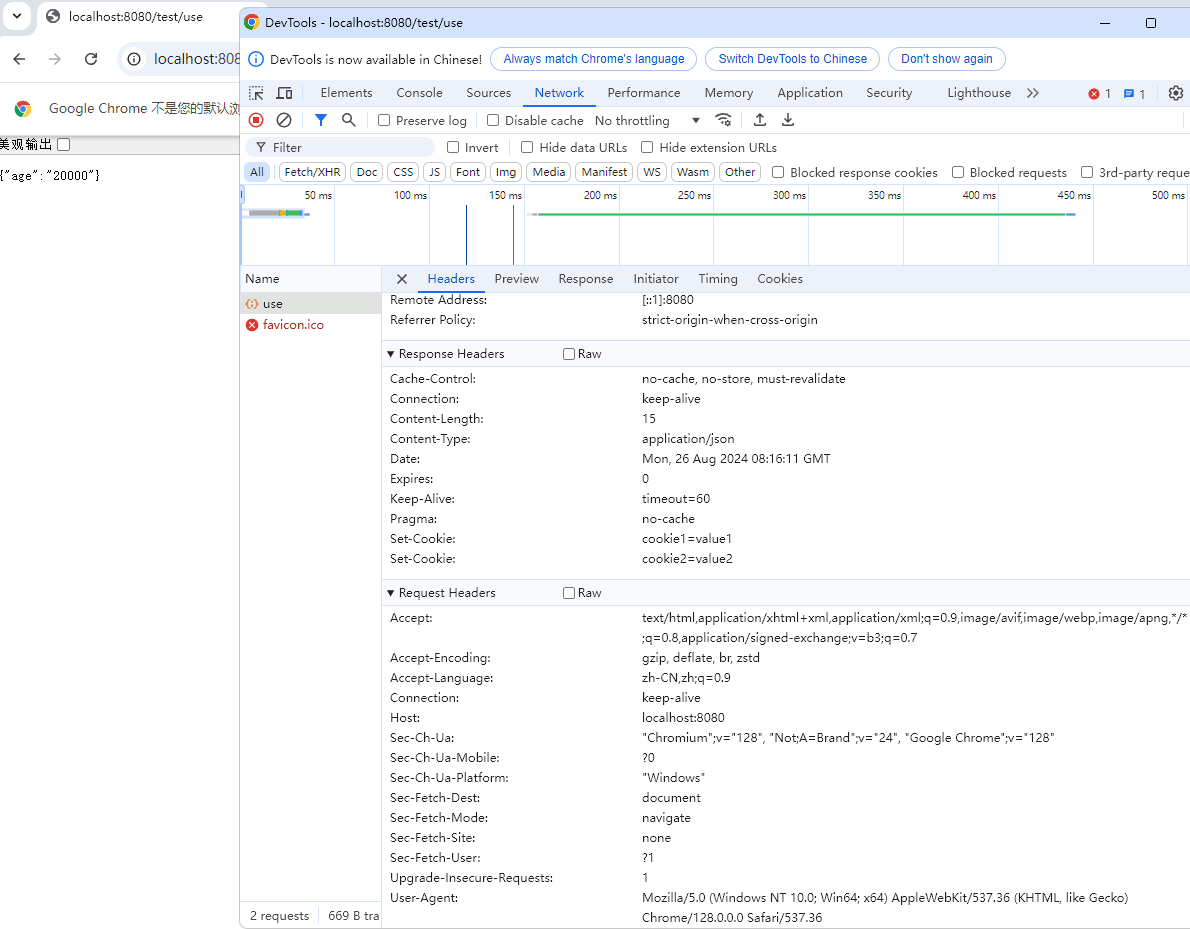
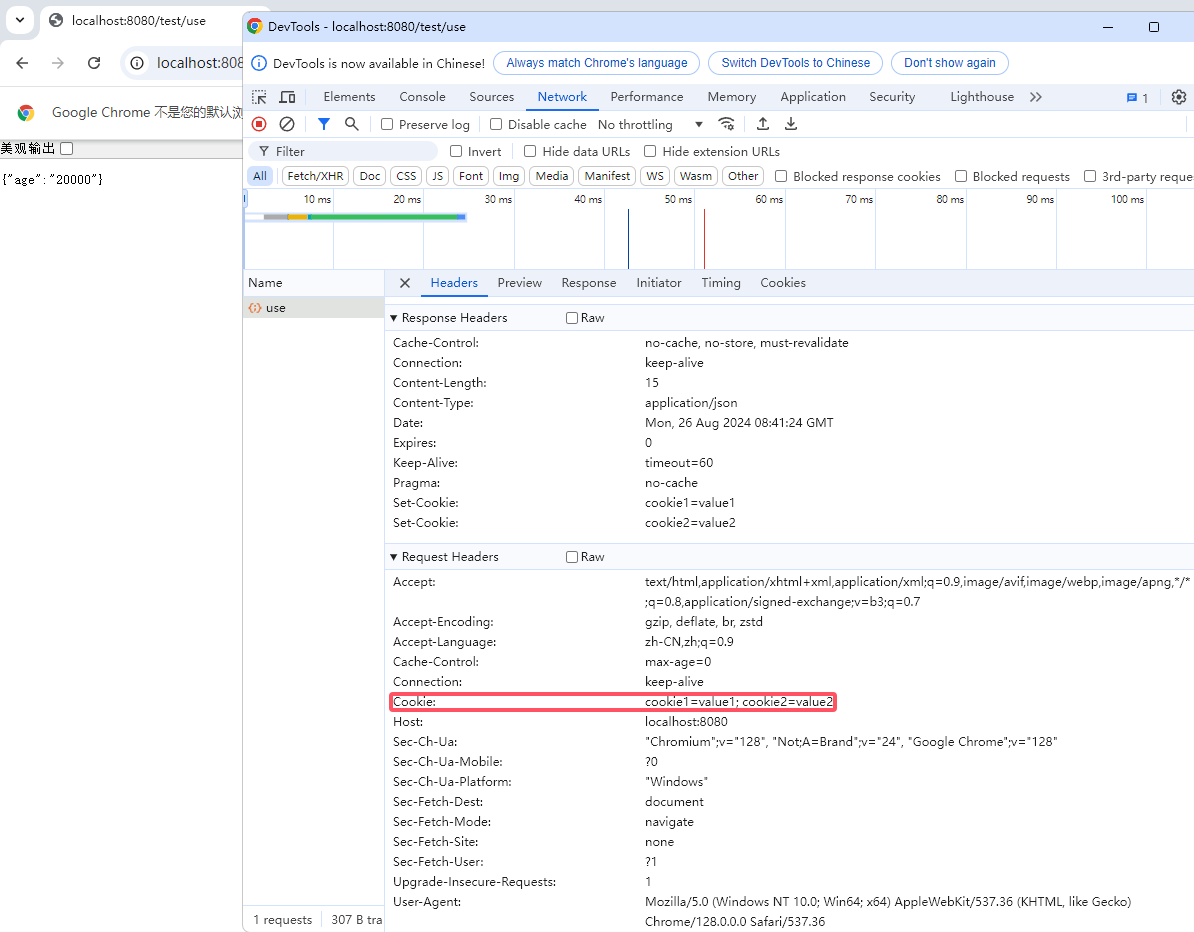
RequestEntity
RequestEntity表示一个HTTP请求,包括请求方法、URI、标头和正文关于URI和URL的区别
- URI(统一资源标识符):
scheme:[//authority]path[?query][#fragment]
scheme:定义资源应该使用哪种协议(如http、https、ftp等)authority:通常包含服务器的地址(例如www.example.com)path:标识资源在服务器上的位置query:查询字符串,通常用于传递参数fragment:片段标识符,用于引用资源内的一个位置- URL(统一资源定位符):
scheme://authority/path?query#fragment
- URL的组成部分与URI相同,但URL必须包含
scheme和authority
构造方法
RequestEntity.BodyBuilder: 使用构建器模式创建RequestEntity。可以通过链式调用设置方法、URI、标头和正文RequestEntity<T>(HttpMethod method, URI url):创建一个具有指定方法和URI的请求实体,没有正文和标头RequestEntity<T>(HttpMethod method, URI url, T body):创建一个具有指定方法、URI和正文的请求实体RequestEntity<T>(HttpMethod method, URI url, MultiValueMap<String, String> headers, T body):创建一个具有指定方法、URI、标头和正文的请求实体
常用方法
getMethod():获取请求方法getUrl():获取请求的URIgetHeaders():获取请求的标头getBody():获取请求的正文
java
import org.springframework.http.HttpMethod;
import org.springframework.http.RequestEntity;
import org.springframework.http.ResponseEntity;
import org.springframework.web.client.RestTemplate;

import java.net.URI;

public class RestClient {

    public static void main(String[] args) {
        RestTemplate restTemplate = new RestTemplate();
        URI uri = URI.create("http://www.baidu.com");

        RequestEntity<Void> requestEntity = RequestEntity.method(HttpMethod.GET, uri).build();

        ResponseEntity<String> responseEntity = restTemplate.exchange(requestEntity, String.class);
        // Response Status: 200 OK
        System.out.println("Response Status: " + responseEntity.getStatusCode());
        // Response Body: <!DOCTYPE html><!--STATUS OK--><html> <head>...
        System.out.println("Response Body: " + responseEntity.getBody());
    }
}
16:47:55.902 [main] DEBUG org.springframework.web.client.RestTemplate - HTTP GET http://www.baidu.com 16:47:55.940 [main] DEBUG org.springframework.web.client.RestTemplate - Accept=[text/plain, application/json, application/*+json, */*] 16:47:56.031 [main] DEBUG org.springframework.web.client.RestTemplate - Response 200 OK 16:47:56.037 [main] DEBUG org.springframework.web.client.RestTemplate - Reading to [java.lang.String] as "text/html"