
SSE协议
SSE(Server-Sent Events,服务器发送事件)是一种基于HTTP的服务器向客户端推送实时数据的技术。它允许服务器单向地向客户端推送事件流
- 单向通信:仅服务器 → 客户端,客户端通过普通HTTP请求建立连接
- 基于HTTP/HTTPS:无需额外协议,使用简单,兼容现有防火墙规则
- 文本协议:默认传输UTF-8文本,支持二进制数据(需Base64编码)
- 自动重连:客户端自动处理连接断开和重试(通过retry字段控制)
- 事件ID支持:通过id字段实现断点续传(客户端断线重连时,自动发送Last-Event-ID头部)
与WebSocket对比:
| 特性 | SSE | WebSocket |
|---|---|---|
| 通信方向 | 仅服务器→客户端 | 全双工 |
| 协议基础 | HTTP(长连接) | 独立协议(ws/wss) |
| 二进制支持 | 需Base64编码 | 原生支持 |
| 断线重连 | 原生支持 | 需手动实现 |
| 兼容性 | 除IE外的主流浏览器 | 广泛支持 |
通信流程
客户端发起请求:通过EventSourceAPI建立连接:
js
const eventSource = new EventSource("http://api.example.com/stream");服务器响应格式:响应头需包含:
Content-Type: text/event-stream
Cache-Control: no-cache
Connection: keep-alive数据格式示例:
event: message
data: {"time": "2023-10-01T12:00:00Z", "value": 42}

event: update
data: 数据内容

: 注释行(客户端忽略)客户端监听事件:
js
eventSource.onmessage = (e) => {
  console.log("收到数据:", e.data);
};
eventSource.addEventListener("update", (e) => {
  console.log("自定义事件:", e.data);
});
基本示例
客户端代码:
html
<script>
    // 创建一个 EventSource 对象,并连接到指定的 URL (原生只支持GET请求)
    const eventSource = new EventSource('https://your-server.com/sse');

    // 监听消息事件,当服务器发送消息时触发
    eventSource.onmessage = function(event) {
      console.log('New message:', event.data);
    };

    // 监听连接打开事件
    eventSource.onopen = function() {
      console.log('Connection to server opened.');
    };

    // 监听错误事件
    eventSource.onerror = function(event) {
      console.error('Error occurred:', event);
      if (eventSource.readyState === EventSource.CLOSED) {
        console.log('Connection was closed.');
      }
    };

    // 关闭连接
    // eventSource.close();
</script>
构造函数
new EventSource(url, [options])url: SSE 服务器的 URLoptions: 可选参数,通常不需要
主要事件
onmessage: 当服务器发送消息时触发onopen: 当连接成功打开时触发onerror: 当连接出现错误或关闭时触发
readyState 属性
EventSource.CONNECTING(0): 正在建立连接EventSource.OPEN(1): 连接已建立,可以接收事件EventSource.CLOSED(2): 连接已关闭,不会接收更多事件
close() 方法
eventSource.close(): 手动关闭连接
使用fetch支持不同请求方式和自定义请求头:
js// 发送请求 const response = await fetch(processedConfig.url, { method: processedConfig.method || 'GET', headers: { // 'Content-Type': 'text/event-stream', 'Content-Type': 'application/json;charset=utf-8', ...processedConfig.headers }, body: processedConfig.data ? JSON.stringify(processedConfig.data) : null, }) const readableStream = response.body
服务端代码:
java
    private String wrapChunk(int id, String content, boolean finished) {
        Map<String, Object> jsonMap = new HashMap<>();
        jsonMap.put("id", id);
        jsonMap.put("content", content);
        jsonMap.put("finished", finished);
        return JacksonUtils.toJsonString(jsonMap);
    }

    @PostMapping(value = "/chat", produces = MediaType.TEXT_EVENT_STREAM_VALUE)
    public Flux<String> chatSSE(@RequestBody ChatDTO chatDTO) {
        Flux<String> responseFlux = getResponseFlux(chatDTO);
        AtomicInteger idCounter = new AtomicInteger(1);
        // 包装响应为 JSON 格式
        Flux<String> wrappedStream = responseFlux
                .map(chunk -> wrapChunk(idCounter.getAndIncrement(), chunk, false));

        String doneChunk = wrapChunk(0, "[DONE]", true);
        // 在响应流末尾添加结束标记
        return Flux.concat(wrappedStream, Flux.just(doneChunk));
    }
响应示例:
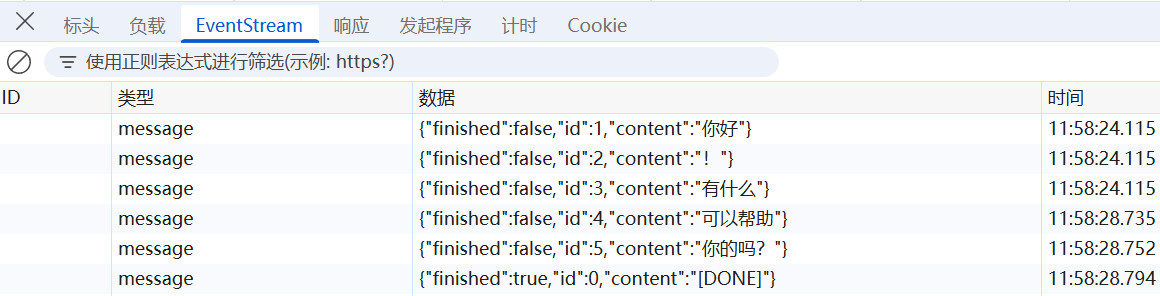
原始报文:
data:{"finished":false,"id":1,"content":"你好"}

data:{"finished":false,"id":2,"content":"!"}

data:{"finished":false,"id":3,"content":"有什么"}

data:{"finished":false,"id":4,"content":"可以帮助"}

data:{"finished":false,"id":5,"content":"你的吗?"}

data:{"finished":true,"id":0,"content":"[DONE]"}