
阿里云OSS存储
阿里云对象存储OSS(Object Storage Service),是一款海量、安全、低成本、高可靠的云存储服务。使用OSS,可以通过网络随时存储和调用包括文本、图片、音频和视频在内的各种文件
使用流程:

Bucket:存储空间是用户用户存储对象(Object)的容器,所有的对象都必需隶属于某个存储空间
官方开发文档:访问管理OSS的Java客户端-OSS Java SDK V1-对象存储-阿里云
OSS管理控制台是阿里云提供的一款简单且易于上手的OSS网页管理工具。通过本教程,您可以在10分钟内完成创建存储空间、上传文件、分享文件等基础操作,预计费用不超过0.01元。
使用指南
创建存储空间
存储空间(Bucket)是存放文件的容器,开始使用OSS前,需要先创建一个Bucket
在左侧导航栏进入Bucket 列表页面,单击创建 Bucket
配置以下关键参数,其余保留默认值:
Bucket名称:输入一个全局唯一的名称,为确保唯一,建议使用项目名-地域-随机字符串的组合,例如
my-project-hangzhou-a1b2c3d4地域:选择距离您较近的地域,例如华东1(杭州),以降低访问延迟
单击完成创建
上传文件
创建Bucket后,可将图片、视频、文档等各种类型的文件(Object)上传至其中
通过控制台单次可上传不超过5GB的文件。对于更大的文件,推荐使用命令行工具ossutil
如果本地没有合适的测试文件,可先下载此示例文件exampleobject.jpg到本地
在Bucket 列表页面,单击刚刚创建的Bucket名称
在左侧导航栏进入文件管理 > 文件列表,然后单击上传文件
将本地的exampleobject.jpg文件拖拽到待上传文件区域,或通过扫描文件选择该文件
保持其他参数默认,单击上传文件
此时,您可以在上传列表页签查看各个文件的上传进度。上传完成后,您可以在目标路径下查看上传文件的文件名、文件大小以及存储类型等信息
下载文件
Bucket中的文件可下载至本地。
- 在文件列表页面,找到刚才上传的exampleobject.jpg文件
- 勾选该文件,然后单击列表下方的下载按钮
分享文件
私有Bucket中的文件,可生成带有时效性的安全链接(URL)进行分享
在文件列表页面,单击
exampleobject.jpg的文件名在右侧弹出的详情面板中,可以按需设置链接的过期时间(秒)(默认为600),然后单击复制文件 URL
- 费用:此URL使用外网Endpoint,任何通过此URL的下载都会产生外网流出流量费
- 安全:分享前,请务必确认文件中不包含任何敏感数据
- 时效:URL在设定的有效期后会自动失效,如需再次访问,需要重新生成
将复制的URL粘贴到浏览器地址栏访问。默认行为是直接下载该图片文件,如需在浏览器中预览图片,则需要绑定自定义域名,使用自定义域名生成URL
清理
为防止文件持续产生费用,需先清空存储空间内的所有文件,然后删除存储空间本身。删除操作不可逆
删除文件
在左侧导航栏,选择文件管理>文件列表
勾选已上传的示例文件exampleobject.jpg
单击列表下方的彻底删除,并在弹窗中单击确定
删除存储空间
删除Bucket后,需要等待数小时(通常为4到8个小时)才能再次创建同名的Bucket
在Bucket 列表页面,单击您要删除的存储空间的名称
在左侧导航栏,单击删除 Bucket
单击立即删除,并按控制台提示完成后续操作
费用说明
本教程涉及的OSS计费项主要包括:
存储费用:文件存放期间,会持续产生标准存储费用
外网下行流量费用:他人使用分享链接(URL)下载文件,会产生外网流出流量费
请求费用:上传、下载操作会产生API请求次数费用
完成本教程(上传一个小于1MB的文件并下载一次)的总费用预计低于0.01元。定价详情参见OSS产品定价
下一步
- 深入成本管理:通过计费概述了解费用详情,并通过资源包节省成本
- 实现自动化:学习SDK快速入门,在应用中通过代码管理OSS
- 更多文件操作:查看功能指引,获取更多管理文件的方法
- 加固数据安全:通过配置权限与访问控制概述,精细化管理数据访问权限
说明:通过OSS控制台创建Bucket时默认开启阻止公共访问。开启后,不允许创建公共访问权限,包括公共读或者公共读写ACL、以及公共访问语义的Bucket Policy。如果您的业务有公共访问需求,可在Bucket创建后关闭阻止公共访问
相关链接:
创建RAM用户
使用RAM用户的AccessKey配置访问凭证
- 在RAM 控制台,创建使用永久AccessKey访问的RAM用户,保存AccessKey,然后为该用户授予
AliyunOSSFullAccess权限- 使用RAM用户的AccessKey配置环境变量
新增RAM用户:
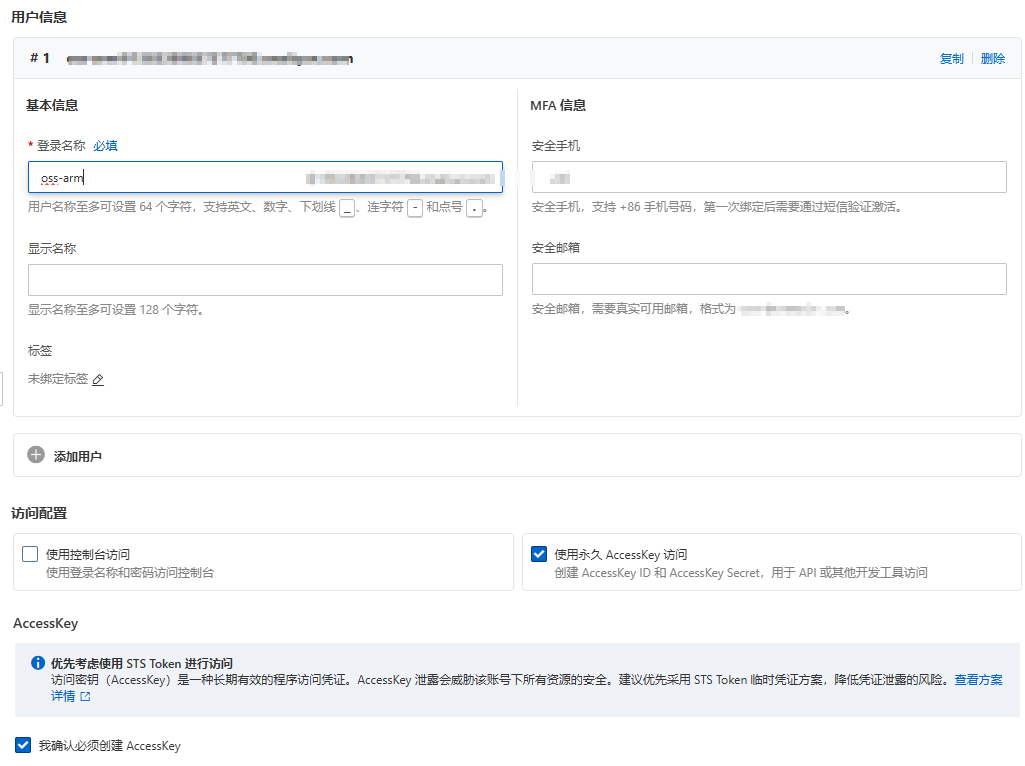
给用户增加权限:
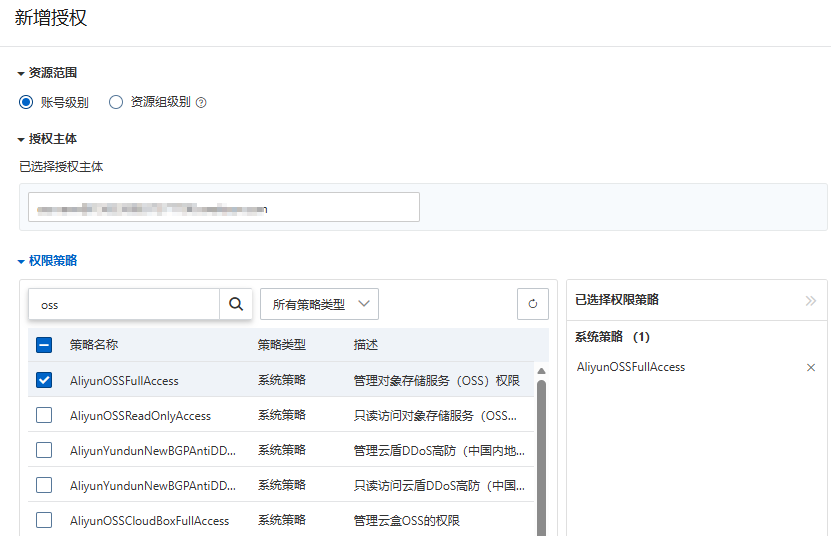
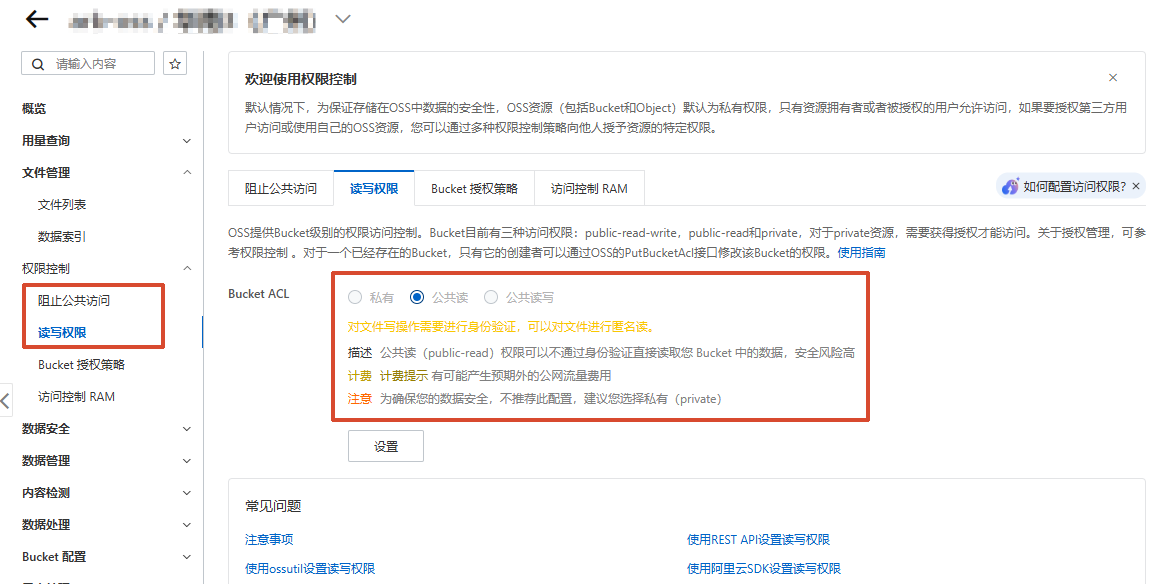
开放权限
开放两个权限:
查看域名:
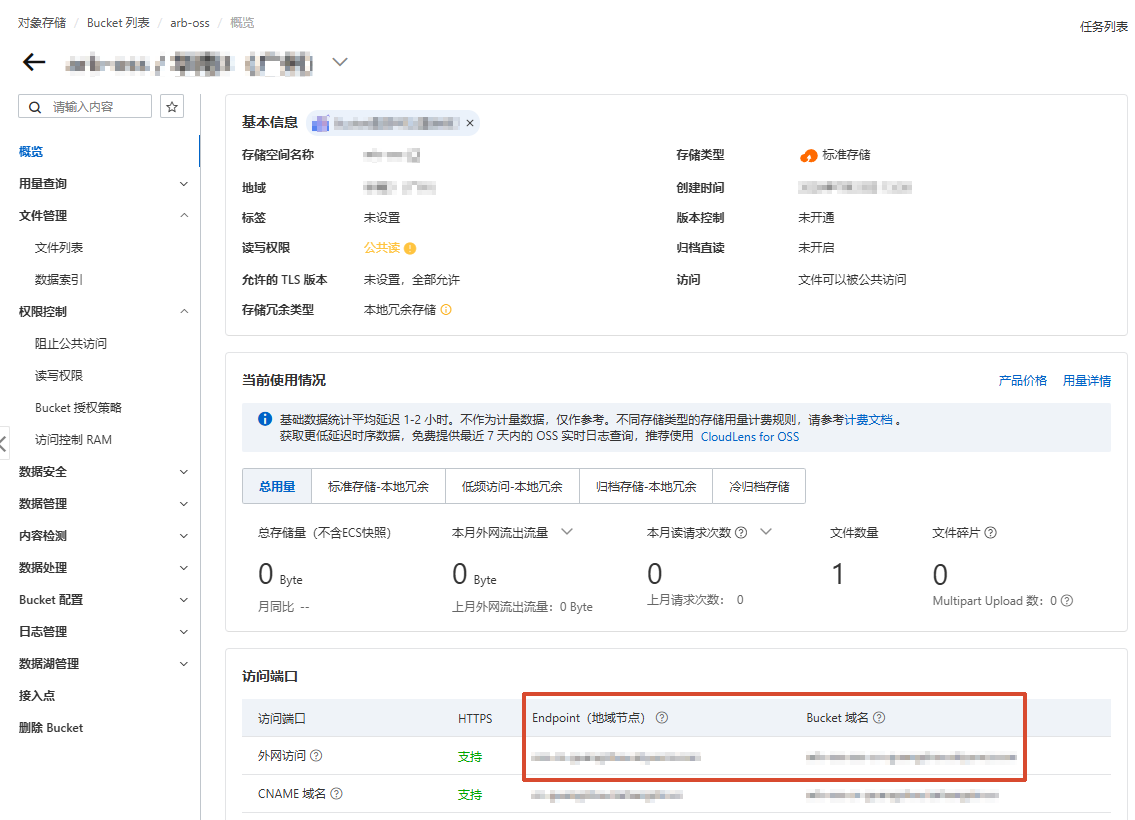
Bucket域名就是公网可以访问的域名,开放权限之后就可以直接访问资源了
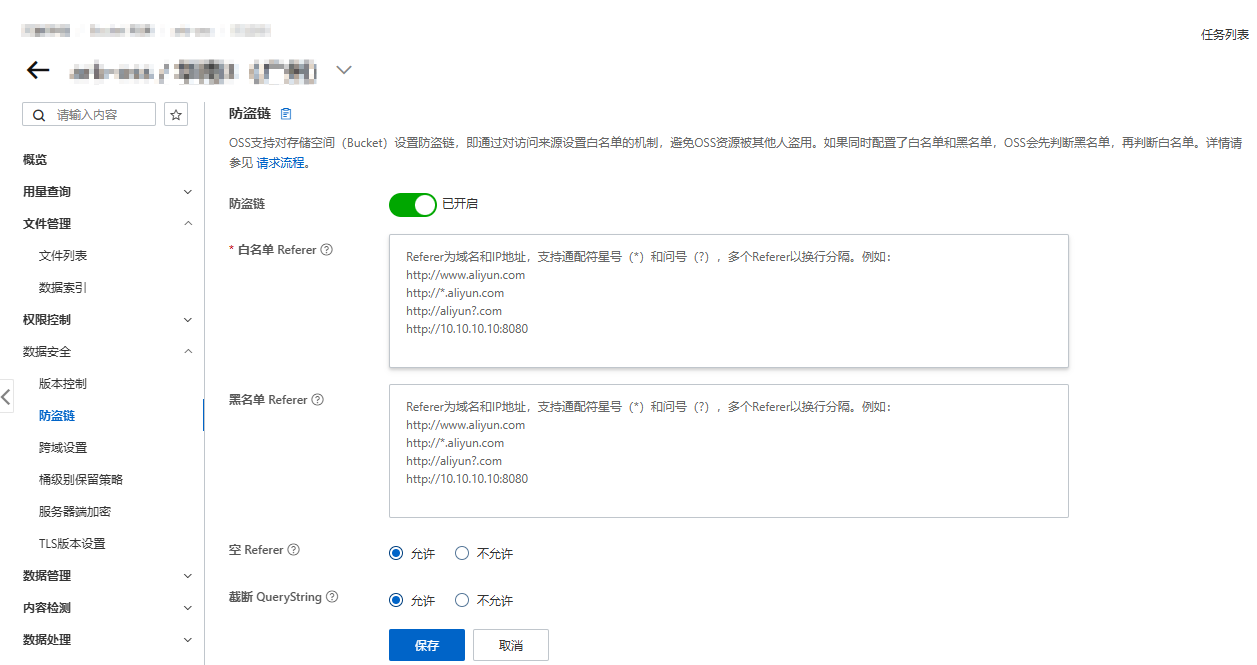
防盗链
跨域配置
<img>标签写了crossorigin="anonymous"(通常是为了canvas绘图、图片转base64、导出等场景),浏览器会以跨域模式请求图片,但OSS没配置对应域名的CORS规则时,浏览器会在校验后直接拦截响应,表现就是「状态码 200,但图片加载失败、控制台报错」
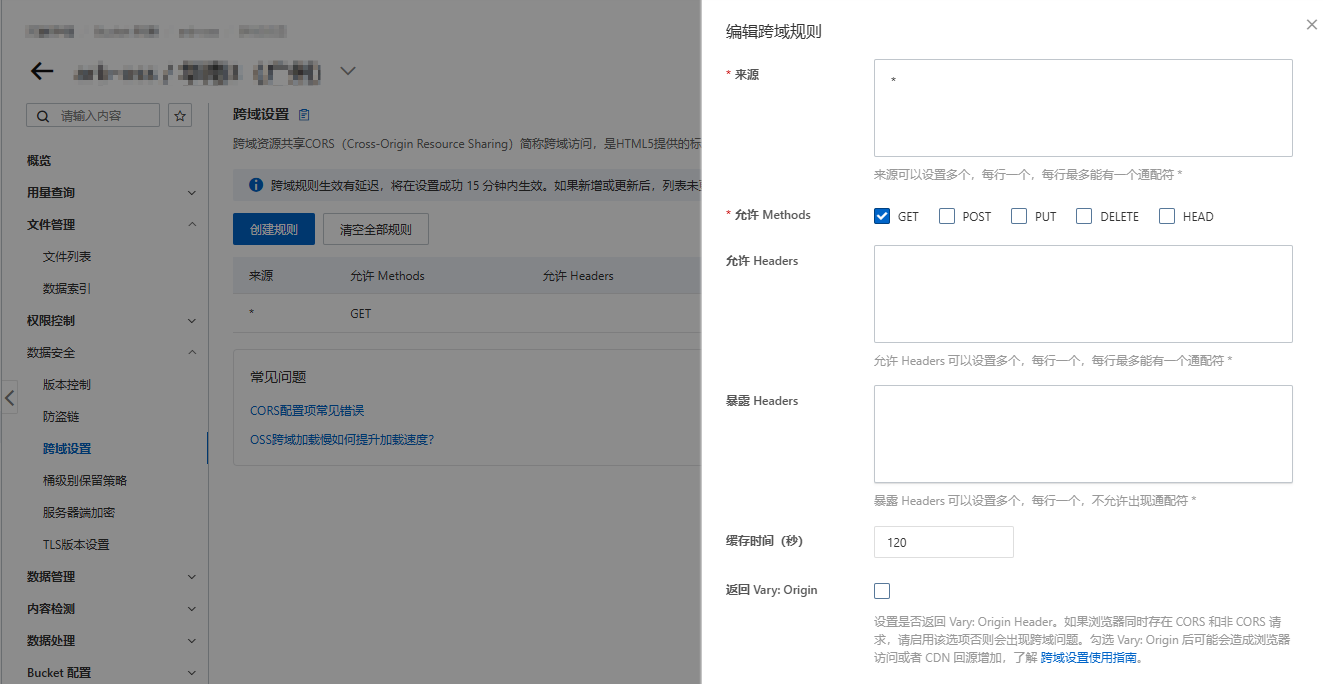
配置后响应头有:
access-control-allow-methods: GETaccess-control-allow-origin:*access-control-max-age:120
图形操作
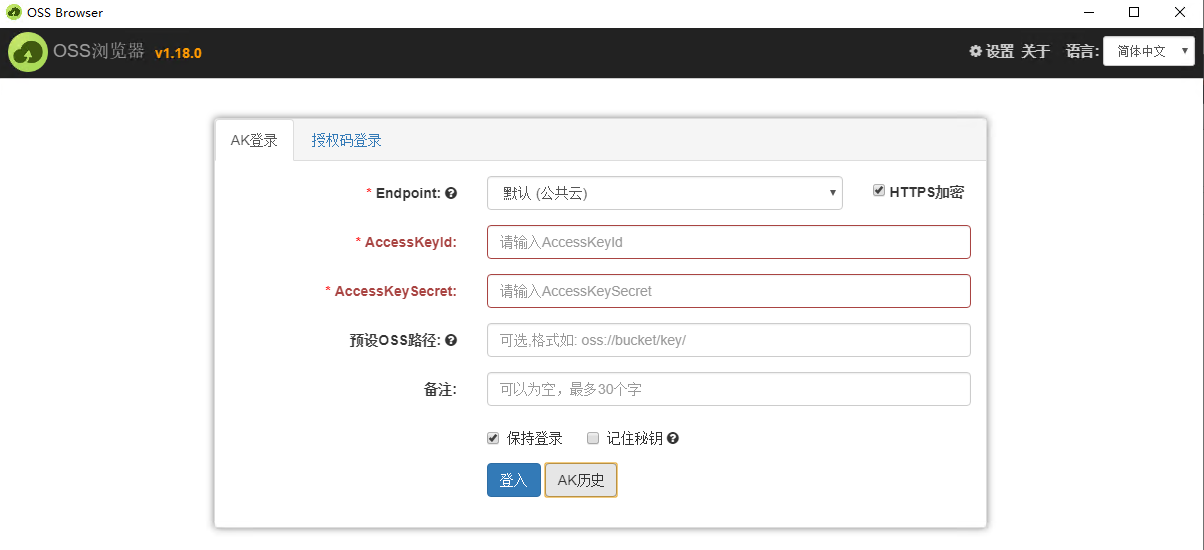
安装ossbrowser:安装图形化管理工具ossbrowser 1.0 - 对象存储 OSS - 阿里云
Windows下载地址:https://gosspublic.alicdn.com/ossbrowser/1.18.0/oss-browser-win32-x64.zip
解压运行oss-browser.exe,填入密钥即可使用
OSS操作
pom.xml
        <!-- 阿里云OSS对象存储 -->
        <dependency>
            <groupId>com.aliyun.oss</groupId>
            <artifactId>aliyun-sdk-oss</artifactId>
            <version>3.15.1</version>
        </dependency>
较高的JDK版本引入的依赖有所不同,具体参考官方文档
上传
Demo.java
import com.aliyun.oss.ClientException;
import com.aliyun.oss.OSS;
import com.aliyun.oss.common.auth.*;
import com.aliyun.oss.OSSClientBuilder;
import com.aliyun.oss.OSSException;
import com.aliyun.oss.model.PutObjectRequest;
import com.aliyun.oss.model.PutObjectResult;
import java.io.FileInputStream;
import java.io.InputStream;

public class Demo {

    public static void main(String[] args) throws Exception {
        // Endpoint以华东1(杭州)为例,其它Region请按实际情况填写。
        // String endpoint = "https://oss-cn-hangzhou.aliyuncs.com";
        String endpoint = "https://oss-cn-guangzhou.aliyuncs.com";
        // 从环境变量中获取访问凭证。运行本代码示例之前,请确保已设置环境变量OSS_ACCESS_KEY_ID和OSS_ACCESS_KEY_SECRET。
        // EnvironmentVariableCredentialsProvider credentialsProvider = CredentialsProviderFactory.newEnvironmentVariableCredentialsProvider();
        // 这里使用传统方式指定
        String accessKeyId = "accessKeyId";
        String accessKeySecret = "accessKeySecret";
        // 填写Bucket名称,例如examplebucket。
        String bucketName = "jkqcyl";
        // 填写Object完整路径,完整路径中不能包含Bucket名称,例如exampledir/exampleobject.txt。
        String objectName = "3.png";
        // 填写本地文件的完整路径,例如D:\\localpath\\examplefile.txt。
        // 如果未指定本地路径,则默认从示例程序所属项目对应本地路径中上传文件流。
        String filePath = "D:\\京东内存卡\\壁纸\\3.png";
        // 传输完成后,且权限开启”公共读“,访问地址为:bucketName、endpoint、objectName的组合
        // https://jkqcyl.oss-cn-guangzhou.aliyuncs.com/3.png

        // 创建OSSClient实例。
        // OSS ossClient = new OSSClientBuilder().build(endpoint, credentialsProvider);
        OSS ossClient = new OSSClientBuilder().build(endpoint, accessKeyId, accessKeySecret);

        try {
            InputStream inputStream = new FileInputStream(filePath);
            // 创建PutObjectRequest对象。
            PutObjectRequest putObjectRequest = new PutObjectRequest(bucketName, objectName, inputStream);
            // 创建PutObject请求。
            PutObjectResult result = ossClient.putObject(putObjectRequest);
        } catch (OSSException oe) {
            System.out.println("Caught an OSSException, which means your request made it to OSS, "
                    + "but was rejected with an error response for some reason.");
            System.out.println("Error Message:" + oe.getErrorMessage());
            System.out.println("Error Code:" + oe.getErrorCode());
            System.out.println("Request ID:" + oe.getRequestId());
            System.out.println("Host ID:" + oe.getHostId());
        } catch (ClientException ce) {
            System.out.println("Caught an ClientException, which means the client encountered "
                    + "a serious internal problem while trying to communicate with OSS, "
                    + "such as not being able to access the network.");
            System.out.println("Error Message:" + ce.getMessage());
        } finally {
            if (ossClient != null) {
                ossClient.shutdown();
            }
        }
    }
}
主要的流程就是在创建OSSClient实例后,调用对象的方法进行操作
下载
流式下载:
            // ossObject包含文件所在的存储空间名称、文件名称、文件元信息以及一个输入流。
            OSSObject ossObject = ossClient.getObject(bucketName, objectName);

            // 读取文件内容。
            System.out.println("Object content:");
            BufferedReader reader = new BufferedReader(new InputStreamReader(ossObject.getObjectContent()));
            while (true) {
                String line = reader.readLine();
                if (line == null) break;

                System.out.println("\n" + line);
            }
            // 数据读取完成后,获取的流必须关闭,否则会造成连接泄漏,导致请求无连接可用,程序无法正常工作。
            reader.close();
            // ossObject对象使用完毕后必须关闭,否则会造成连接泄漏,导致请求无连接可用,程序无法正常工作。
            ossObject.close();
下载到本地:
        String pathName = "D:\\localpath\\examplefile.txt";


            // 下载Object到本地文件,并保存到指定的本地路径中。如果指定的本地文件存在会覆盖,不存在则新建。
            // 如果未指定本地路径,则下载后的文件默认保存到示例程序所属项目对应本地路径中。
            ossClient.getObject(new GetObjectRequest(bucketName, objectName), new File(pathName));
删除
删除单个:
            // 删除文件或目录。如果要删除目录,目录必须为空。
            ossClient.deleteObject(bucketName, objectName);
删除多个:
            // 删除文件。
            // 填写需要删除的多个文件完整路径。文件完整路径中不能包含Bucket名称。
            List<String> keys = new ArrayList<String>();
            keys.add("exampleobjecta.txt");
            keys.add("testfolder/sampleobject.txt");
            keys.add("exampleobjectb.txt");

            DeleteObjectsResult deleteObjectsResult = ossClient.deleteObjects(new DeleteObjectsRequest(bucketName).withKeys(keys).withEncodingType("url"));
            List<String> deletedObjects = deleteObjectsResult.getDeletedObjects();
查找
判断文件是否存在:
            // 判断文件是否存在。如果返回值为true,则文件存在,否则存储空间或者文件不存在。
            // 设置是否进行重定向或者镜像回源。默认值为true,表示忽略302重定向和镜像回源;如果设置isINoss为false,则进行302重定向或者镜像回源。
            //boolean isINoss = true;
            boolean found = ossClient.doesObjectExist(bucketName, objectName);
            //boolean found = ossClient.doesObjectExist(bucketName, objectName, isINoss);
            System.out.println(found);
目录
在Bucket下创建目录:
        // 填写目录名称,目录需以正斜线结尾。(可以一次创建多层)
        String objectName = "exampledir/";


            String content = "";

            // 创建PutObjectRequest对象。
            PutObjectRequest putObjectRequest = new PutObjectRequest(bucketName, objectName, new ByteArrayInputStream(content.getBytes()));

            // 如果需要上传时设置存储类型和访问权限,请参考以下示例代码。
            // ObjectMetadata metadata = new ObjectMetadata();
            // metadata.setHeader(OSSHeaders.OSS_STORAGE_CLASS, StorageClass.Standard.toString());
            // metadata.setObjectAcl(CannedAccessControlList.Private);
            // putObjectRequest.setMetadata(metadata);

            // 上传字符串。
            ossClient.putObject(putObjectRequest);
OSS使用
使用MultipartFile对象接收,常用的方法有:
getOriginalFilename():获取上传的文件名getInputStream():获取输入流transferTo(File dest):将接收的文件转存到磁盘文件中getSize():获取文件的大小,单位字节getBytes():获取文件内容的字节数组
Spring Boot默认最大文件上传为1MB,修改application.yml
spring:
  servlet:
    multipart:
      max-file-size: 10MB
      max-request-size: 10MB
控制层代码示例:
    @PostMapping("/testUp")
    public void testUp(MultipartFile multipartFile) throws IOException {
        String endpoint = "https://oss-cn-guangzhou.aliyuncs.com";
        String accessKeyId = "accessKeyId";
        String accessKeySecret = "accessKeySecret";
        String bucketName = "jkqcyl";
        // 如果objectName指定的目录不存在,则会在bucket中创建对应的目录
        String objectName = "a.png";

        OSSOperateUtils ossOperateUtils = new OSSOperateUtils(endpoint,accessKeyId,accessKeySecret,bucketName);
        System.out.println(ossOperateUtils.upload(objectName, multipartFile.getInputStream()));
        System.out.println(ossOperateUtils.getThumbnailURL(objectName,200,null));
    }
OSSOperateUtils.java
import com.aliyun.oss.ClientException;
import com.aliyun.oss.OSS;
import com.aliyun.oss.OSSClientBuilder;
import com.aliyun.oss.OSSException;
import com.aliyun.oss.model.GetObjectRequest;
import com.aliyun.oss.model.PutObjectRequest;
import com.aliyun.oss.model.PutObjectResult;

import java.io.*;

public class OSSOperateUtils {
    private String endpoint;
    private String accessKeyId;
    private String accessKeySecret;
    private String bucketName;

    public OSSOperateUtils() {
    }

    public OSSOperateUtils(String endpoint, String accessKeyId, String accessKeySecret, String bucketName) {
        this.endpoint = endpoint;
        this.accessKeyId = accessKeyId;
        this.accessKeySecret = accessKeySecret;
        this.bucketName = bucketName;
    }

    /**
     * 上传本地文件到OSS服务器上
     * @param objectName OSS路径
     * @param filePath 本地文件路径
     */
    public String upload(String objectName, String filePath) throws OSSException, ClientException{
        // 创建OSSClient实例。
        // OSS ossClient = new OSSClientBuilder().build(endpoint, credentialsProvider);
        OSS ossClient = new OSSClientBuilder().build(endpoint, accessKeyId, accessKeySecret);

        try {
            InputStream inputStream = new FileInputStream(filePath);
            // 创建PutObjectRequest对象。
            PutObjectRequest putObjectRequest = new PutObjectRequest(bucketName, objectName, inputStream);
            // 创建PutObject请求。
            PutObjectResult result = ossClient.putObject(putObjectRequest);
            return getMontageURL(objectName);
        } catch (OSSException oe) {
            System.out.println("Caught an OSSException, which means your request made it to OSS, "
                    + "but was rejected with an error response for some reason.");
            System.out.println("Error Message:" + oe.getErrorMessage());
            System.out.println("Error Code:" + oe.getErrorCode());
            System.out.println("Request ID:" + oe.getRequestId());
            System.out.println("Host ID:" + oe.getHostId());
        } catch (ClientException ce) {
            System.out.println("Caught an ClientException, which means the client encountered "
                    + "a serious internal problem while trying to communicate with OSS, "
                    + "such as not being able to access the network.");
            System.out.println("Error Message:" + ce.getMessage());
        } catch (FileNotFoundException e) {
            e.printStackTrace();
        } finally {
            if (ossClient != null) {
                ossClient.shutdown();
            }
        }
        return null;
    }

    /**
     * 以文件流形式上传到OSS服务器上
     * @param objectName OSS路径
     * @param inputStream 文件流
     */
    public String upload(String objectName, InputStream inputStream){
        // 创建OSSClient实例。
        // OSS ossClient = new OSSClientBuilder().build(endpoint, credentialsProvider);
        OSS ossClient = new OSSClientBuilder().build(endpoint, accessKeyId, accessKeySecret);

        try {
            // 创建PutObjectRequest对象。
            PutObjectRequest putObjectRequest = new PutObjectRequest(bucketName, objectName, inputStream);
            // 创建PutObject请求。
            PutObjectResult result = ossClient.putObject(putObjectRequest);
            return getMontageURL(objectName);
        } catch (OSSException oe) {
            System.out.println("Caught an OSSException, which means your request made it to OSS, "
                    + "but was rejected with an error response for some reason.");
            System.out.println("Error Message:" + oe.getErrorMessage());
            System.out.println("Error Code:" + oe.getErrorCode());
            System.out.println("Request ID:" + oe.getRequestId());
            System.out.println("Host ID:" + oe.getHostId());
        } catch (ClientException ce) {
            System.out.println("Caught an ClientException, which means the client encountered "
                    + "a serious internal problem while trying to communicate with OSS, "
                    + "such as not being able to access the network.");
            System.out.println("Error Message:" + ce.getMessage());
        } finally {
            if (ossClient != null) {
                ossClient.shutdown();
            }
        }
        return null;
    }

    /**
     * 下载文件到本机服务器上
     * @param objectName OSS路径
     * @param pathName 本地文件路径
     */
    public void downloadLocality(String objectName, String pathName){
        // 创建OSSClient实例。
        // OSS ossClient = new OSSClientBuilder().build(endpoint, credentialsProvider);
        OSS ossClient = new OSSClientBuilder().build(endpoint, accessKeyId, accessKeySecret);

        try {
            // 下载Object到本地文件,并保存到指定的本地路径中。如果指定的本地文件存在会覆盖,不存在则新建。
            // 如果未指定本地路径,则下载后的文件默认保存到示例程序所属项目对应本地路径中。
            ossClient.getObject(new GetObjectRequest(bucketName, objectName), new File(pathName));
        } catch (OSSException oe) {
            System.out.println("Caught an OSSException, which means your request made it to OSS, "
                    + "but was rejected with an error response for some reason.");
            System.out.println("Error Message:" + oe.getErrorMessage());
            System.out.println("Error Code:" + oe.getErrorCode());
            System.out.println("Request ID:" + oe.getRequestId());
            System.out.println("Host ID:" + oe.getHostId());
        } catch (ClientException ce) {
            System.out.println("Caught an ClientException, which means the client encountered "
                    + "a serious internal problem while trying to communicate with OSS, "
                    + "such as not being able to access the network.");
            System.out.println("Error Message:" + ce.getMessage());
        } finally {
            if (ossClient != null) {
                ossClient.shutdown();
            }
        }
    }

    /**
     * 删除OSS服务器上的文件
     * @param objectName OSS路径
     */
    public void delete(String objectName){
        // 创建OSSClient实例。
        // OSS ossClient = new OSSClientBuilder().build(endpoint, credentialsProvider);
        OSS ossClient = new OSSClientBuilder().build(endpoint, accessKeyId, accessKeySecret);

        try {
            // 删除文件或目录。如果要删除目录,目录必须为空。
            ossClient.deleteObject(bucketName, objectName);
        } catch (OSSException oe) {
            System.out.println("Caught an OSSException, which means your request made it to OSS, "
                    + "but was rejected with an error response for some reason.");
            System.out.println("Error Message:" + oe.getErrorMessage());
            System.out.println("Error Code:" + oe.getErrorCode());
            System.out.println("Request ID:" + oe.getRequestId());
            System.out.println("Host ID:" + oe.getHostId());
        } catch (ClientException ce) {
            System.out.println("Caught an ClientException, which means the client encountered "
                    + "a serious internal problem while trying to communicate with OSS, "
                    + "such as not being able to access the network.");
            System.out.println("Error Message:" + ce.getMessage());
        } finally {
            if (ossClient != null) {
                ossClient.shutdown();
            }
        }
    }

    /**
     * 查找OSS服务器上文件是否存在
     * @param objectName OSS路径
     * @return 文件是否存在
     */
    public boolean seek(String objectName){
        // 创建OSSClient实例。
        // OSS ossClient = new OSSClientBuilder().build(endpoint, credentialsProvider);
        OSS ossClient = new OSSClientBuilder().build(endpoint, accessKeyId, accessKeySecret);

        boolean found = false;
        try {
            // 判断文件是否存在。如果返回值为true,则文件存在,否则存储空间或者文件不存在。
            // 设置是否进行重定向或者镜像回源。默认值为true,表示忽略302重定向和镜像回源;如果设置isINoss为false,则进行302重定向或者镜像回源。
            //boolean isINoss = true;
            found = ossClient.doesObjectExist(bucketName, objectName);
            return found;
            //boolean found = ossClient.doesObjectExist(bucketName, objectName, isINoss);
            //System.out.println(found);
        } catch (OSSException oe) {
            System.out.println("Caught an OSSException, which means your request made it to OSS, "
                    + "but was rejected with an error response for some reason.");
            System.out.println("Error Message:" + oe.getErrorMessage());
            System.out.println("Error Code:" + oe.getErrorCode());
            System.out.println("Request ID:" + oe.getRequestId());
            System.out.println("Host ID:" + oe.getHostId());
        } catch (ClientException ce) {
            System.out.println("Caught an ClientException, which means the client encountered "
                    + "a serious internal problem while trying to communicate with OSS, "
                    + "such as not being able to access the network.");
            System.out.println("Error Message:" + ce.getMessage());
        } finally {
            if (ossClient != null) {
                ossClient.shutdown();
            }
        }
        return found;
    }

    /**
     * 创建文件目录
     * @param objectName 需要创建的文件目录
     */
    public void createDirectory(String objectName){
        OSS ossClient = new OSSClientBuilder().build(endpoint, accessKeyId, accessKeySecret);
        try {
            String content = "";

            // 创建PutObjectRequest对象。
            PutObjectRequest putObjectRequest = new PutObjectRequest(bucketName, objectName, new ByteArrayInputStream(content.getBytes()));

            // 如果需要上传时设置存储类型和访问权限,请参考以下示例代码。
            // ObjectMetadata metadata = new ObjectMetadata();
            // metadata.setHeader(OSSHeaders.OSS_STORAGE_CLASS, StorageClass.Standard.toString());
            // metadata.setObjectAcl(CannedAccessControlList.Private);
            // putObjectRequest.setMetadata(metadata);

            // 上传字符串。
            ossClient.putObject(putObjectRequest);
        } catch (OSSException oe) {
            System.out.println("Caught an OSSException, which means your request made it to OSS, "
                    + "but was rejected with an error response for some reason.");
            System.out.println("Error Message:" + oe.getErrorMessage());
            System.out.println("Error Code:" + oe.getErrorCode());
            System.out.println("Request ID:" + oe.getRequestId());
            System.out.println("Host ID:" + oe.getHostId());
        } catch (ClientException ce) {
            System.out.println("Caught an ClientException, which means the client encountered "
                    + "a serious internal problem while trying to communicate with OSS, "
                    + "such as not being able to access the network.");
            System.out.println("Error Message:" + ce.getMessage());
        } finally {
            if (ossClient != null) {
                ossClient.shutdown();
            }
        }
    }

    /**
     * 获取图片访问的url
     * @param objectName OSS路径
     * @return 图片访问的url
     */
    public String getMontageURL(String objectName){
        if (endpoint.contains("ttp")){
            endpoint = endpoint.split("//")[1];
        }
        return "https://" + bucketName + "." + endpoint + "/" + objectName;
    }

    /**
     * 上传图片后获取压缩后的url(都赋值会进行两次压缩,而不会返回width×height的图)
     * @param width 定义图片宽
     * @param height 定义图片高
     * @return 压缩后的url
     */
    public String getThumbnailURL(String objectName, Integer width, Integer height){
        String montageURL = getMontageURL(objectName);
        if (!(width == null || width.equals(0)) && !(height == null || height.equals(0))){
            return montageURL + "?x-oss-process=image/resize,w_" + width + ",h_" + height;
        }
        if (!(width == null || width.equals(0))){
            return montageURL + "?x-oss-process=image/resize,w_" + width;
        }
        if (!(height == null || height.equals(0))){
            return montageURL + "?x-oss-process=image/resize,h_" + height;
        }
        return null;
    }
}