
模块化
概念
将一个复杂的程序文件依据一定规则(规范)拆分成多个文件的过程称之为模块化
其中拆分出的每个文件就是一个模块 ,模块的内部数据是私有的,不过模块可以暴露内部数据以便其它模块使用
模块化好处:
- 防止命名冲突
- 高复用性
- 高维护性
暴露数据
module.exports=valueexports.name=value
module.exports可以暴露"任意"数据不能使用
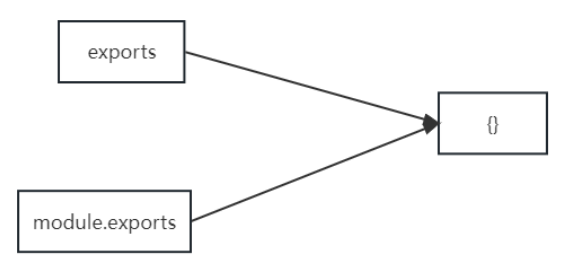
exports = value的形式暴露数据,模块内部 module 与 exports 的隐式关系exports = module.exports = {},require返回的是目标模块中module.exports的值
导入模块
在模块中使用 require 传入文件路径即可引入文件
const test = require('./me.js');require使用的注意事项:
- 对于自己创建的模块,导入时路径建议写相对路径 ,且不能省略
./和../ - js 和 json 文件导入时可以不用写后缀,c/c++编写的 node 扩展文件也可以不写后缀,但是一般用不到
- 如果导入其他类型的文件,会以 js 文件进行处理
- 如果导入的路径是个文件夹,则会首先检测该文件夹下
package.json文件中main属性对应的文件- 如果存在则导入,反之如果文件不存在会报错
- 如果 main 属性不存在,或者
package.json不存在,则会尝试导入文件夹下的index.js和index.json - 如果还是没找到,就会报错
- 导入 node.js 内置模块时,直接 require 模块的名字即可,无需加
./和../
me.js
js
// 声明函数
function tiemo(){
    console.log("贴膜")
}

function again(){
    console.log("再贴一张")
}

// 暴露数据(单个)
// module.exports = tiemo

// 暴露多个数据
// module.exports = {
//     tiemo,
//     again
// }

// 等同于
exports.tiemo = tiemo
exports.again = again
模块化.js
js
// 导入模块
const tiemo = require('./me.js')

// 调用函数(单个)
// tiemo() --> 贴膜
tiemo.again()
tiemo.tiemo()
导入模块的基本流程
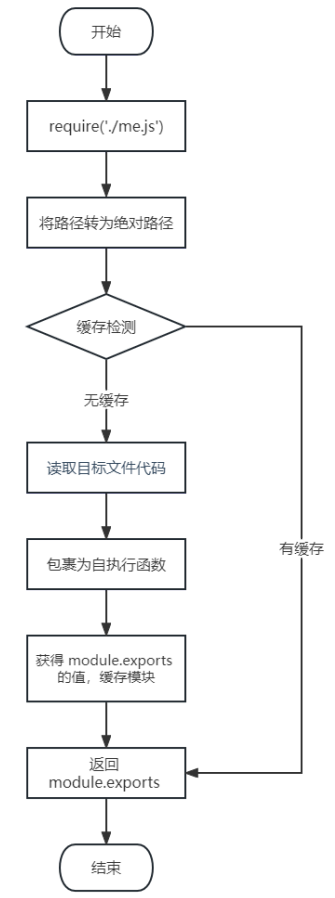
导入自定义模块的基本流程:
- 将相对路径转为绝对路径,定位目标文件
- 缓存检测
- 读取目标文件代码
- 包裹为一个函数并执行(自执行函数)。通过
arguments.callee.toString()查看自执行函数 - 缓存模块的值
- 返回
module.exports的值
CommonJS规范
module.exports、exports以及require这些都是CommonJS模块化规范中的内容
Node.js 是实现了 CommonJS 模块化规范,二者关系有点像 JavaScript 与 ECMAScript