OpenFeign远程调用
OpenFeign是一个声明式的http客户端,是SpringCloud在Eureka公司开源的Feign基础上改造而来,其作用就是基于SpringMVC的常见注解,优雅的实现http请求的发送
官方地址:OpenFeign/feign: Feign makes writing java http clients easier (github.com)
基本使用
pom.xml
xml
    <!-- openFeign -->
    <dependency>
        <groupId>org.springframework.cloud</groupId>
        <artifactId>spring-cloud-starter-openfeign</artifactId>
    </dependency>

    <!-- 负载均衡器 -->
    <dependency>
        <groupId>org.springframework.cloud</groupId>
        <artifactId>spring-cloud-starter-loadbalancer</artifactId>
    </dependency>
测试代码:
java
import org.springframework.cloud.openfeign.FeignClient;
import org.springframework.web.bind.annotation.GetMapping;
import org.springframework.web.bind.annotation.RequestParam;
import java.util.List;

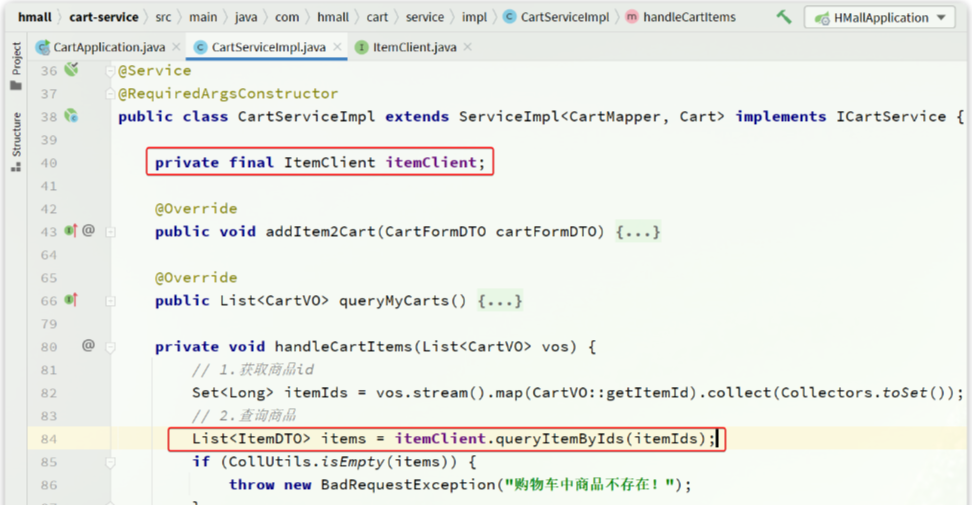
@FeignClient("item-service")
public interface ItemClient {

    @GetMapping("/items")
    List<ItemDTO> queryItemByIds(@RequestParam("ids") Collection<Long> ids);
}
这里只需要声明接口,无需实现方法。接口中的几个关键信息:
@FeignClient("item-service"):声明服务名称@GetMapping:声明请求方式@GetMapping("/items"):声明请求路径@RequestParam("ids") Collection<Long> ids:声明请求参数List<ItemDTO>:返回值类型
连接池
Feign底层发起http请求,依赖于其它的框架。其底层支持的http客户端实现包括:
HttpURLConnection:默认实现,不支持连接池Apache HttpClient:支持连接池OKHttp:支持连接池
pom.xml
xml
    <!-- OK http 的依赖 -->
    <dependency>
        <groupId>io.github.openfeign</groupId>
        <artifactId>feign-okhttp</artifactId>
    </dependency>
application.yml
yaml
feign:
  okhttp:
    enabled: true  # 开启OKHttp功能
日志配置
OpenFeign只会在FeignClient所在包的日志级别为DEBUG时,才会输出日志。而且其日志级别有4级:
NONE:不记录任何日志信息,这是默认值BASIC:仅记录请求的方法,URL以及响应状态码和执行时间HEADERS:在BASIC的基础上,额外记录了请求和响应的头信息FULL:记录所有请求和响应的明细,包括头信息、请求体、元数据
定义日志配置类DefaultFeignConfig.java:
java
import feign.Logger;
import org.springframework.context.annotation.Bean;

public class DefaultFeignConfig {

    @Bean
    public Logger.Level feignLogLevel(){
        return Logger.Level.FULL;
    }
}
要让日志级别生效,还需要配置这个类。有两种方式:
局部生效:在某个
FeignClient中配置,只对当前FeignClient生效- java
@FeignClient(value = "item-service", configuration = DefaultFeignConfig.class)
全局生效:在
@EnableFeignClients中配置,针对所有FeignClient生效- java
@EnableFeignClients(defaultConfiguration = DefaultFeignConfig.class)
日志格式:
17:35:32:148 DEBUG 18620 --- [nio-8082-exec-1] com.hmall.api.client.ItemClient          : [ItemClient#queryItemByIds] ---> GET http://item-service/items?ids=100000006163 HTTP/1.1
17:35:32:148 DEBUG 18620 --- [nio-8082-exec-1] com.hmall.api.client.ItemClient          : [ItemClient#queryItemByIds] ---> END HTTP (0-byte body)
17:35:32:278 DEBUG 18620 --- [nio-8082-exec-1] com.hmall.api.client.ItemClient          : [ItemClient#queryItemByIds] <--- HTTP/1.1 200  (127ms)
17:35:32:279 DEBUG 18620 --- [nio-8082-exec-1] com.hmall.api.client.ItemClient          : [ItemClient#queryItemByIds] connection: keep-alive
17:35:32:279 DEBUG 18620 --- [nio-8082-exec-1] com.hmall.api.client.ItemClient          : [ItemClient#queryItemByIds] content-type: application/json
17:35:32:279 DEBUG 18620 --- [nio-8082-exec-1] com.hmall.api.client.ItemClient          : [ItemClient#queryItemByIds] date: Fri, 26 May 2023 09:35:32 GMT
17:35:32:279 DEBUG 18620 --- [nio-8082-exec-1] com.hmall.api.client.ItemClient          : [ItemClient#queryItemByIds] keep-alive: timeout=60
17:35:32:279 DEBUG 18620 --- [nio-8082-exec-1] com.hmall.api.client.ItemClient          : [ItemClient#queryItemByIds] transfer-encoding: chunked
17:35:32:279 DEBUG 18620 --- [nio-8082-exec-1] com.hmall.api.client.ItemClient          : [ItemClient#queryItemByIds]
17:35:32:280 DEBUG 18620 --- [nio-8082-exec-1] com.hmall.api.client.ItemClient          : [ItemClient#queryItemByIds] [{"id":100000006163,"name":"巴布豆(BOBDOG)柔薄悦动婴儿拉拉裤XXL码80片(15kg以上)","price":67100,"stock":10000,"image":"https://m.360buyimg.com/mobilecms/s720x720_jfs/t23998/350/2363990466/222391/a6e9581d/5b7cba5bN0c18fb4f.jpg!q70.jpg.webp","category":"拉拉裤","brand":"巴布豆","spec":"{}","sold":11,"commentCount":33343434,"isAD":false,"status":2}]
17:35:32:281 DEBUG 18620 --- [nio-8082-exec-1] com.hmall.api.client.ItemClient          : [ItemClient#queryItemByIds] <--- END HTTP (369-byte body)
示例代码
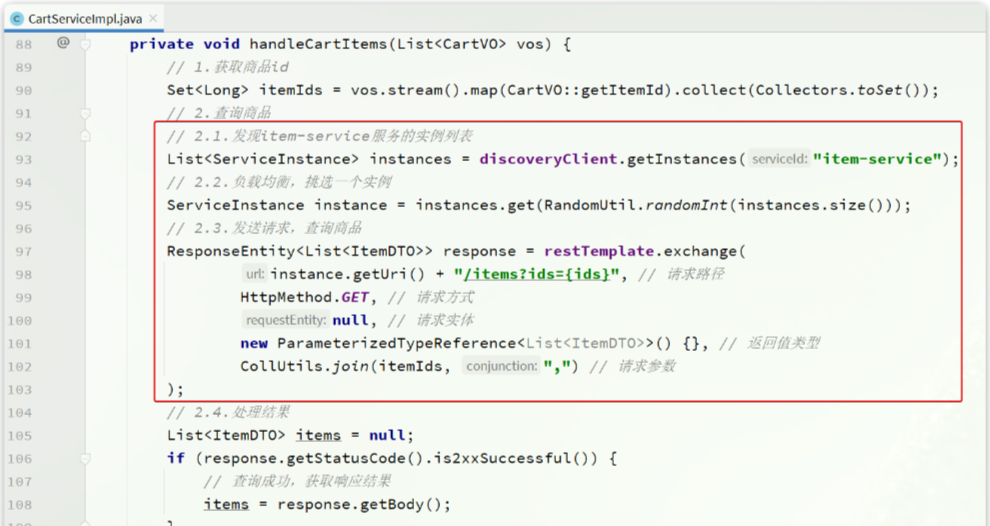
利用Nacos实现服务的治理,利用RestTemplate实现了服务的远程调用,但是远程代码太复杂了:
直接使用ItemClient方法: